Get to the result.
Earlier matches while indexing, more frequent input checks and less repeated work as you type. Index strings are allocated as needed to reduce startup memory use.
BEAM68 0.2 / NOW AVAILABLE
Your Amiga, one shortcut away. Find apps, explore drawers and get little jobs done — without leaving Workbench.
NEW IN 0.2
A new plugin, finer preview settings and a calmer background. Built around the way you use your Amiga.
Earlier matches while indexing, more frequent input checks and less repeated work as you type. Index strings are allocated as needed to reduce startup memory use.
Choose which plugins may preview, enter an exact delay and keep background requests bounded. Preferences now reports the version of the running launcher, too.
Search Aminet, read package details and confirm downloads from Beam68. The new plugin is included and disabled by default; enable it when you need it.
Meet Aminet Browser →A FAMILIAR DESKTOP. A QUICKER ROUTE.
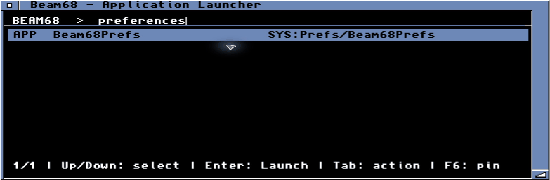
Names, abbreviations, aliases or a small typo. Search selected drawers and narrow things down with scopes like app:, prefs: and fav:games.
Calculate in place, check the clock or control your music. Fourteen bundled plugins turn a launcher into a handy everyday companion.
Workbench colors or a custom theme. Pick your fonts, spacing and indexed drawers in the separate, native Preferences app.
SMALL TOOL. USEFUL TRICKS.
Calculate without opening another window, browse command help with F1, or explore Aminet through the new plugin. Read package information before choosing what to download.
=12*(3+4)A quick calculationprefs:Find a preferencefav:gamesJump to your favorites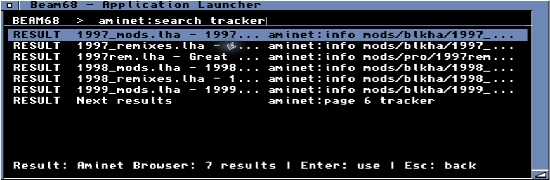
 Beam68Prefs / General
FEELS AT HOME ON WORKBENCH.
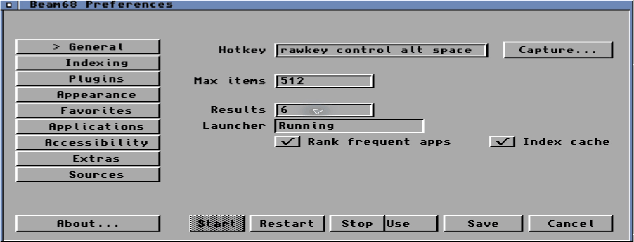
A resident Commodity for quick access. A separate Preferences app for everything else. Nine sections keep your index, favorites, plugins and appearance in one place.
READY WHEN YOU ARE.
Choose Novice for an automatic installation, or customize the destination and plugins. Updates retain your saved settings.
Open SYS:Prefs/Beam68Prefs. Choose Use for this session, or Save to keep your settings.
Type a name and press Enter. F1 opens help; F7 brings back your query history.
Get the latest published release. Browse release packages →
THE PRACTICAL DETAILS
AmigaOS 3.0 or later and a 68000 or later CPU. AmigaOS 3.2 and a 68020 are recommended. The included binaries target 68000 and need no FPU.
Memory use depends on your index and plugins. Version 0.2 allocates index strings as needed; minimum-memory and physical 68000 testing remain open.
Workbench launching uses workbench.library V44+ when available, with a fallback for older supported systems. Optional features use apps such as WHDLoad, OpenURL or your music player. English is built in; German and Swedish catalogues are included.
Plugins are native code. Install only code you trust; capability labels do not restrict access. Shell commands can be disabled in Preferences.
Source & compatibility →A FEW QUICK ANSWERS
Getting started with Beam68.
AmigaOS 3.0 or later and a 68000 or later CPU. No FPU is required. AmigaOS 3.2 and a 68020 are recommended. Memory use depends on the size of your index and the plugins you enable; minimum-memory and physical 68000 testing remain open. See compatibility notes.
Unpack the Amiga binary package and open Install. Novice mode handles the standard setup automatically. Average and Expert let you choose the destination and plugins, then start Beam68. Press Ctrl + Alt + Space to open the launcher. Use Beam68Prefs to choose which drawers to index and adjust the shortcut.
The Download page links to tagged GitHub releases, with the Amiga LHA, plugin SDK ZIP and individual checksums. Application source is available from the Git tag. The latest published packages are listed automatically.
Calculate, browse drawers, find files, check memory and dates, or use clipboard and system tools. Fourteen bundled plugins provide extra commands. Some integrations need their host applications. Press F1 to browse command help, or explore the plugin list.
Yes. Preferences offers fonts, spacing and themes, with four theme files included. The Developers page documents the plugin SDK and portable theme format. All bundled native plugins use Protocol 1. Third-party marketplace listings are planned.
No. It searches packages, shows details and readmes, and asks before downloading. Installation preparation opens the downloaded archive in your archive handler; follow that package’s own installer. Aminet Browser requires a TCP/IP stack and is disabled by default.
Yes. Version 0.2 preserves saved settings, aliases, snippets, additional plugins and edited bundled themes. Novice reuses the remembered installation location. Choose Save in Preferences to keep changes across restarts.
Yes, Beam68 is licensed under MIT. The code and SDK are available through the GitHub repository. Visit Source for toolchain requirements and instructions to build the app yourself.